Submitting a building permit through a city portal is now standard practice across the United States. I’ve worked with homeowners and contractors nationwide, and I’ve seen how small documentation mistakes can delay approval for weeks especially when site plans are not prepared correctly for digital review.
If you plan to submit site plan online for building permit approval, the process must be handled with precision. Digital submission does not mean relaxed standards. In many cases, reviewers examine plans even more closely using zoom tools to verify measurements, zoning compliance, and structural placement.
When I guide clients through online permit submission, I focus on accuracy, compliance, and clarity from the start. That structured approach prevents correction cycles and accelerates approval timelines.
Understanding the Online Building Permit Application Process
Most building departments now require applications through an online permit portal. While each jurisdiction varies slightly, the structure is similar nationwide.
A typical online building permit application requires:
- A properly scaled site drawing in PDF format
- Clearly defined property boundary lines
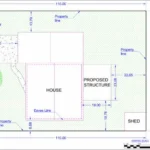
- Existing and proposed structures
- Accurate setback measurements
- Additional residential or commercial permit documents if applicable
City permit portal submission systems are designed for efficiency, but they demand precise documentation. Every line, label, and dimension must be readable and compliant with zoning regulations.
Verify Local Building Department Requirements First

Before preparing to submit site plan online, I always review the specific jurisdiction’s requirements. Cities and counties often publish detailed submission guidelines outlining:
- Required drawing scale (for example, 1” = 20’)
- North arrow and legend
- Lot dimensions and total lot area
- Distance from structures to property lines
- Driveway access and utility locations if applicable
Missing even one required detail can trigger a correction notice.
Building department requirements vary, but zoning compliance details and setback measurements are always critical. Confirming these early prevents delays later.
Confirm Drawing Accuracy Before Digital Site Plan Submission
Accuracy is the foundation of permit approval.
Property boundary lines must match official records. Structure dimensions must be measurable. Setbacks must reflect current zoning codes.
I’ve seen firsthand how incorrect lot measurements or unclear proposed improvements lead to rejection. Reviewers rely on the site plan to verify compliance with land use regulations if they cannot clearly confirm compliance, they must issue corrections.
Before you upload site plan for permit review, confirm:
- Measurements are correct
- All structures are labeled
- Scale is clearly visible
- Both existing and proposed conditions are shown
This preparation significantly reduces the risk of entering a correction cycle.
Step-by-Step: How to Submit Site Plan Online
1. Create or Access Your Permit Portal Account
Register through your city’s online building permit portal. Ensure the property address matches tax records exactly. Even minor formatting inconsistencies can slow administrative screening.
2. Select the Correct Permit Type
Choose the proper category residential addition, accessory structure, remodel, or commercial modification.
Selecting the wrong permit type often results in processing delays before technical review even begins.
3. Upload the Site Plan in Proper PDF Format
Digital permit submission requires clean formatting.
Before uploading:
- Confirm the file is a clear PDF
- Ensure it is not password protected
- Verify that scale remains readable when zoomed
- Use a professional file name
Blurry scans, rotated drawings, or incomplete pages frequently cause rejection during initial screening.
4. Review All Documents Before Final Submission
Most online systems provide a final review screen. I advise carefully inspecting every uploaded document before clicking submit.
Confirm:
- Correct document categories are selected
- All required attachments are included
- No pages are missing
Once submitted, revisions typically require responding to formal correction comments, which extends the timeline.
What Happens After You Submit Site Plan Online
After submission, the permit approval process typically includes:
Initial Screening
Verification that documents are present, complete, and readable.
Zoning and Compliance Review
Officials evaluate setback measurements, lot coverage, structural placement, and access points.
Correction Notice (If Required)
If deficiencies are found, written comments are issued outlining required revisions.
When a site plan clearly demonstrates compliance, review moves significantly faster. Ambiguity creates delays.
Common Reasons Site Plans Are Rejected
Over the years, I’ve noticed consistent patterns behind rejections:
- Missing setback measurements
- Incorrect property boundaries
- Incomplete structure labeling
- Lack of scale reference
- Unclear proposed improvements
- Poor PDF formatting
Each correction cycle can add days or weeks depending on jurisdiction workload.
A properly prepared digital site plan submission reduces these risks substantially.
Managing Corrections After Submission
If you receive correction comments, respond methodically.
Do not make partial updates. Address each comment individually and update the drawing precisely. When resubmitting, clearly label the revised file and upload it under the correct document category.
A structured and professional resubmission often shortens the second review timeline.
When Professional Drafting Support Makes a Difference
Some property owners attempt to prepare their own site drawings. While this can work for simple projects, online permit systems require strict scale accuracy, zoning detail, and professional formatting.
At SitePlans.online, I prepare permit-ready site plans specifically designed for digital submission standards across multiple jurisdictions in the United States. My focus is on:
- Accurate scaled site drawings
- Verified setback measurements
- Clean PDF site plan format
- Clear labeling of property boundary lines
- Structured revision support if required
Professional preparation minimizes rejection risk and strengthens approval outcomes.
Final Thoughts
Submitting a site plan through an online permit system requires more than simply uploading a drawing. When I help clients submit site plan online, I focus on zoning compliance, accurate measurements, and proper digital formatting from the beginning.
A structured approach reduces correction cycles, prevents unnecessary delays, and strengthens approval timelines. With careful preparation, digital permit submission becomes a controlled and efficient process rather than a frustrating one.
Why Choose SitePlans.online
At SitePlans.online, I focus on delivering permit ready site plans designed specifically for digital submission standards across the United States.
• Accurate, scaled site plans prepared to meet city and county portal requirements
• Careful review of zoning setbacks and property dimensions before submission
• Clean PDF formatting optimized for online permit systems
• Fast turnaround with structured revision support if required
• Experience assisting homeowners and contractors nationwide
Frequently Asked Questions
Do all cities require digital site plan submission?
Most major cities and counties now require online building permit applications, including digital uploads. However, document standards vary by jurisdiction.
What format is required to submit a site plan online?
In most cases, a properly scaled and readable PDF file is required. The file should not be password protected.
Can I submit a hand drawn site plan?
Hand-drawn sketches are rarely accepted unless they meet strict scale and labeling standards. Professionally drafted plans significantly improve approval chances.
How long does review take?
Timelines vary based on city workload and project complexity. Initial screening may take a few days, while full zoning review may take longer.
What if my site plan is rejected?
You must revise the drawing according to reviewer comments and resubmit through the city permit portal. Addressing all comments clearly improves reapproval speed.