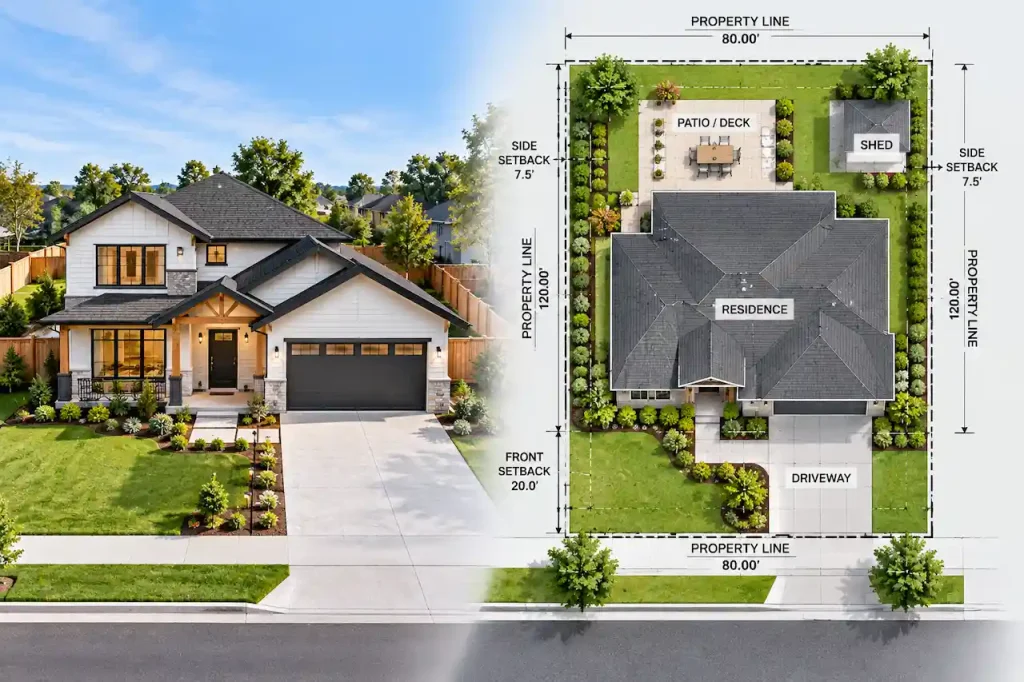

Running one job site is hard enough. Running four or five at once, each sitting in a different county’s permit queue, is where most contractors lose weeks they never get back. A crew shows up ready to frame, and the permit for that address is still sitting in “under review.” Materials are on order. The client is calling. And the office has no clean answer for which of the six open permits is actually the problem.
Permit delays on multiple job sites are almost never caused by one big mistake. They’re caused by small, repeatable gaps: no single tracker showing every permit’s status, incomplete site plans that trigger correction notices, and no one owning the follow-up once an application is submitted. Fix those three gaps and most contractors cut their average approval time significantly, without changing which county they’re building in.
This guide breaks down where multi-site permit delays actually come from, what experienced contractors do differently, and a simple system you can put in place this week.
Why Multiple Job Sites Multiply Permit Risk
A single project has one permit, one reviewer, and one timeline to watch. Add a second and third project, and the math changes fast. You’re no longer tracking one risk — you’re tracking several independent risks running in parallel, each with its own reviewer, its own local requirements, and its own chance of getting flagged for correction.
Contractors managing several active jobs often describe the same pattern in industry forums: schedules and crews get planned around an assumed permit date, and when one county’s review takes longer than expected, the whole sequence — framing, inspections, the next trade lined up behind it — shifts. The delay on one site doesn’t stay contained to that site; it pushes into the next week’s schedule everywhere else.
A few conditions make this worse specifically when you’re running multiple sites at once:
- Different jurisdictions, different rules. A site plan that sailed through one county’s review can get bounced by the next for a setback measurement or drainage detail the first county didn’t ask about.
- No centralized view of status. When permit tracking lives in five different inboxes or sticky notes, no one notices a stalled application until a crew is already standing on-site.
- Reused templates. A site plan built for one lot rarely transfers cleanly to another — property lines, easements, and grading conditions are never identical, and building departments notice the mismatch immediately.
- Multiple contractors, one address. On larger jobs with several trades pulling separate permits for the same property, departments won’t stack duplicate permits for identical scope, which creates confusion about who’s actually cleared to start work.
The Most Common Causes of Permit Delays Across Job Sites
Before fixing the problem, it helps to know exactly where the time actually goes. In our experience preparing site plans for contractors juggling multiple active addresses, four causes account for the overwhelming majority of lost weeks.
1. Correction Notices From Incomplete Submissions
A correction notice is the single biggest killer of a multi-site schedule, because it doesn’t just delay the flagged project — it resets your resubmission cycle and pulls your attention away from the other sites you’re also trying to keep moving. Missing drainage details, incorrect setback measurements, or an unclear property line are the most common triggers reviewers cite when a plan gets kicked back for revision.
2. No Owner for Permit Follow-Up
On a single job, the GC or PM naturally tracks the permit because it’s the only one on their plate. Across four or five sites, follow-up becomes everyone’s job and no one’s job. Applications sit in a queue longer than necessary simply because no one called to confirm receipt or answer a reviewer’s question in time.
3. Inconsistent Site Plans Across Properties
Contractors under deadline pressure sometimes reuse a site plan format that worked on one property and adjust it quickly for the next. Reviewers catch this fast — a plan that doesn’t reflect the actual grading, easements, or structure placement of the specific lot is one of the fastest ways to trigger a rejection instead of an approval.
4. Scheduling Crews Before Permits Clear
The most expensive mistake on a multi-site schedule is locking in a framing or trade date based on an assumed permit timeline rather than a confirmed one. When the permit slips even a few days, the crew still shows up, and that idle labor cost is often more painful than the permit delay itself.
A System for Tracking Permits Across Multiple Job Sites
Contractors who consistently avoid multi-site permit delays tend to run a version of the same lightweight system, whether it lives in a spreadsheet, a project management tool, or a permitting platform.
| Element | What It Should Show |
| Site address & permit number | One row per job site, no exceptions |
| Submission date | When the application actually went in |
| Jurisdiction & reviewer contact | Who to call if status stalls |
| Current status | Submitted / Under Review / Corrections Requested / Approved |
| Next action owner | Named person responsible for the next follow-up |
| Crew start date | Locked only after permit status is “Approved,” never before |
The value of this isn’t the spreadsheet itself — it’s the discipline of reviewing it on a set day each week, so a stalled application gets caught in three days instead of three weeks. Pairing that tracker with a site plan review process you actually follow before submission catches most avoidable rejections before they ever reach a reviewer’s desk.
How to Prevent Correction Notices Before They Happen
Since correction notices cause the longest delays, preventing them is the highest-leverage fix available to a contractor running multiple sites. The most reliable approach is a pre-submission checklist applied to every site plan, regardless of how routine the project seems:
- Confirm property lines and setback distances against the specific parcel, not a similar one nearby
- Include drainage and grading details even when the project seems unrelated to water flow
- Verify the wall height, structure placement, or addition dimensions match what’s actually being built
- Double-check that the plan reflects existing easements, since an overlooked easement can derail a submission entirely
If a correction notice does come back on one of your sites, responding quickly and completely the first time matters more than responding fast with a partial fix — a second round of corrections costs far more time than getting the first response right.
Managing Reviewer Communication Across Several Counties
When you have permits open in three different counties, expecting each reviewer to move at the same pace is unrealistic. Some jurisdictions clear routine residential permits in days; others route the same scope through multiple departments. Contractors who avoid getting blindsided build in a standing check-in cadence — a short call or portal check on a fixed day each week — rather than waiting for a rejection notice to force the conversation.
It also helps to know, before you submit, which of your open jobs are likely to need a licensed engineer’s stamp based on scope, since that requirement alone can add a review step you’ll want to plan for rather than discover midway through the process.
Should You Handle Multi-Site Permitting In-House or Outsource It?
For contractors running two or three jobs a year, in-house tracking is manageable. Past that volume, the administrative load of chasing corrections, formatting site plans to each county’s standard, and keeping every reviewer relationship current starts competing directly with time spent actually running your crews.
This is the point where many builders shift toward white-label site plan support so every drawing arrives already formatted to the receiving county’s expectations, without pulling a project manager off the phone to redo a rejected drawing. The goal isn’t to remove yourself from the process — it’s to remove the parts of the process that don’t require your judgment.
Conclusion
Permit delays on multiple job sites rarely come from bad luck or an unusually slow county. They come from gaps in tracking, site plans that don’t match the specific property, and no one owning follow-up once an application goes in. A contractor running several sites who builds a simple weekly tracking habit, submits complete and property-specific site plans, and responds to corrections fast and fully will consistently outpace competitors who treat each permit as a fire to put out only once it’s already burning. The fix isn’t more paperwork — it’s a system that catches problems while they’re still small.
FAQs
1. Why do permit delays affect multiple job sites more than a single project?
Each job site has its own reviewer, jurisdiction, and set of local requirements, so a delay on one site rarely stays contained — it typically pushes crew schedules and trade sequencing on your other active projects too.
2. Can multiple contractors get separate permits for the same property?
Yes. Building departments commonly issue separate permits to different licensed contractors working on distinct scopes of the same property, but they generally won’t issue duplicate permits for identical work, which is a common source of confusion contractors raise in industry forums.
3. What’s the fastest way to catch a stalled permit before it delays a crew?
A weekly review of a centralized tracker showing submission date, current status, and a named follow-up owner catches a stalled application within days instead of weeks.
4. Do correction notices reset the entire permit timeline?
Not entirely, but a correction notice does restart the review clock for the flagged items, and a second round of corrections (from an incomplete first response) is what typically causes the longest delays.
5. Is it worth outsourcing site plans when managing several active jobs?
For contractors running more than a few permits at once, outsourcing site plan preparation to a service familiar with each county’s format often returns more time than it costs, since it removes the rework cycle caused by inconsistent, reused templates.
Take the Next Step With Confidence
Avoid unnecessary delays and prepare for your permit application with greater confidence. Use our free tools to review your project and understand the next steps before moving forward.
ADU Feasibility Checker
Check whether your property may be suitable for an accessory dwelling unit.
Check ADU Feasibility 02Site Plan Checker
Review your drawing for common missing details and potential submission issues.
Review Your Site Plan 03Permit Requirements Checker
Identify the likely permit requirements for your location and project type.
Check Requirements 04Site Plan Cost Calculator
Get a quick site plan cost estimate based on your project requirements.
Calculate Your CostGet Your Permit Drawing Scope Reviewed
Send us the property address and project details. We’ll help identify the likely drawing scope and next step.

Engineer Wasim
Civil/Structural Engineer and founder behind Site Plans Online USA. His permit-drafting experience dates back to 2015, supporting residential, commercial, structural and site-development projects.
Learn More About Site Plans LLC →